How to Start with PLC Programming: A Step-by-Step Guide for Beginners
In recent years, the field of PLC programming has gained significant traction as the backbone of industrial automation. According to a report by MarketsandMarkets, the global industrial automation market is expected to reach $214 billion by 2026, with a substantial portion attributed to the growing reliance on programmable logic controllers (PLCs). The need for skilled PLC programmers has never been more pressing, as companies strive to enhance productivity and efficiency in their operations.
As highlighted by automation expert Dr. John Smith, "The ability to effectively program PLCs is essential for the future of manufacturing," emphasizing the vital role that PLC programming plays in optimizing automation processes. This statement underscores the importance of a solid foundational understanding for beginners eager to enter the field. With industries increasingly leaning towards automation solutions, having the skills to navigate PLC programming can open pathways to a promising career.
In this guide, we will walk you through the essential steps to start your journey in PLC programming. From understanding the basic concepts to practical applications, this resource will equip you with the critical skills necessary to succeed in this pivotal area of technology. Whether you aspire to work in manufacturing, process control, or any automated industry, mastering PLC programming will set you on a path to becoming an integral part of the industrial automation revolution.

Understanding the Basics of PLCs and Their Applications
Programmable Logic Controllers (PLCs) are critical components in modern industrial automation. They serve as the backbone of various manufacturing processes, providing real-time control and monitoring capabilities that enhance efficiency and safety. According to a recent report by MarketsandMarkets, the global PLC market is projected to grow from USD 8.4 billion in 2021 to USD 11.9 billion by 2026, reflecting a compound annual growth rate (CAGR) of 7.4%. This growth is driven by the increasing adoption of automation solutions across different sectors, including automotive, food and beverage, and pharmaceuticals.
Understanding the basics of PLCs involves grasping their core functionalities, including input/output (I/O) management, ladder logic programming, and communication protocols. PLCs process data from various sensors and devices, executing control commands that can significantly improve production efficiency. The industrial sector's move towards Industry 4.0 and the Internet of Things (IoT) further emphasizes the importance of PLCs, integrating them with smart technologies to facilitate real-time data analysis and predictive maintenance. Research indicates that leveraging IoT capabilities can lead to a 20% reduction in plant operational costs, underscoring the importance of PLC programming skills for aspiring automation professionals.
Applications of PLC technology are vast and varied, ranging from simple automated systems to complex manufacturing setups. Industries rely on PLCs for tasks such as assembly line automation, quality control, and packaging processes. A study by the International Society of Automation highlights that up to 80% of manufacturing companies use PLCs to improve their production lines, showcasing their integral role in enhancing operational efficiency and product quality. As industries continue to evolve, those who understand PLC programming will be well-positioned to take advantage of the burgeoning automation landscape.
Essential Components of a PLC System and Their Functions
A Programmable Logic Controller (PLC) system consists of several essential components that work together to automate industrial processes. At the core of the PLC is the Central Processing Unit (CPU), which acts as the brain of the system, interpreting input signals, executing control instructions, and sending output commands. The CPU ensures that the entire PLC operates effectively and efficiently, managing tasks from simple operations to complex control strategies.
Input and output modules enhance the functionality of the PLC by facilitating communication between the controller and the external environment. Input modules receive signals from various sensors and devices, converting these signals into a format that the CPU can process. Conversely, output modules relay commands from the CPU to actuators, motors, or other devices that carry out physical actions in the system. Additionally, the power supply is crucial, providing the necessary energy for the PLC and its components to function correctly. These interconnected parts form the backbone of any PLC system, ensuring reliable and automated control in a variety of industrial applications.
PLC Programming Components Analysis
This chart illustrates the importance level of essential components in a PLC (Programmable Logic Controller) system, where a higher value indicates greater significance in programming and operational efficiency.
Installing and Configuring Your First PLC Hardware
Installing and configuring your first PLC (Programmable Logic Controller) hardware can seem daunting, but by breaking it down into manageable steps, you can streamline the process. Start by selecting a suitable PLC based on your project requirements. Consider factors such as input/output (I/O) capacity, memory size, and communication protocols. Once you've chosen your PLC, the first step is to gather all necessary hardware components, including the power supply, I/O modules, and any necessary cables.
After you have all the components, proceed to physically set up your PLC. Begin by connecting the power supply, ensuring that all connections are secure and correctly oriented. Next, attach the I/O modules to the PLC, making sure you follow the manufacturer’s guidelines for proper slot connections. It’s crucial to refer to the instructional manual that comes with your hardware, as it will provide vital information on wiring and setup configurations.
**Tips:** When configuring the PLC, take your time to double-check all connections and settings. This attention to detail can save you from troubleshooting issues later on. Additionally, always make sure the PLC is powered off while you are connecting hardware components to avoid any electrical hazards. Lastly, keep a detailed log of every step you take; this practice not only helps in troubleshooting but also aids in understanding your setup better as you progress in your programming journey.
How to Start with PLC Programming: A Step-by-Step Guide for Beginners - Installing and Configuring Your First PLC Hardware
| Step |
Description |
Estimated Time (Hours) |
Resources Needed |
| 1 |
Select and purchase PLC hardware suitable for your project. |
2 |
PLC device manual, Compatibility guide. |
| 2 |
Install the PLC hardware in a safe and accessible location. |
1 |
Screwdriver, Mounting brackets, Power supply. |
| 3 |
Connect input and output devices to the PLC. |
3 |
Wiring tools, Input/output devices (sensors, actuators). |
| 4 |
Download and install the programming software on your computer. |
1 |
Computer, Internet connection. |
| 5 |
Create and test a simple program to control the outputs. |
4 |
Programming software, PLC hardware. |
| 6 |
Monitor and troubleshoot the program performance. |
2 |
Diagnostic tools, documentation. |
Writing Your First PLC Program: A Step-by-Step Approach
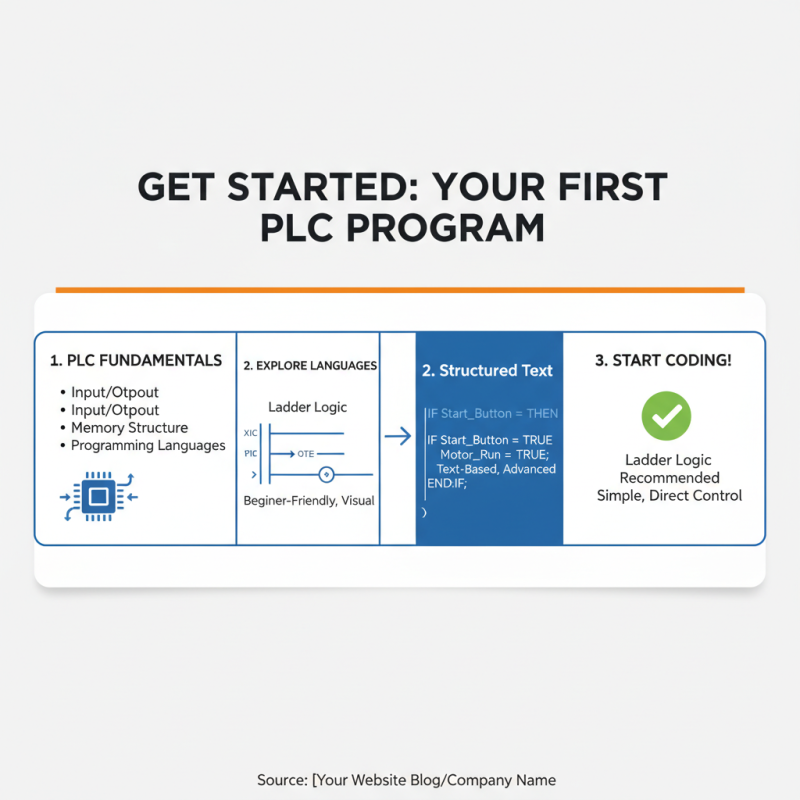
To begin writing your first PLC program, start by familiarizing yourself with the basic concepts of PLCs (Programmable Logic Controllers). Understanding how a PLC functions, including its input/output operations, memory structure, and programming languages will serve as a strong foundation. Take some time to explore the different types of PLC programming languages, such as ladder logic and structured text. Ladder logic, being visually similar to electrical relay logic, is often recommended for beginners due to its straightforward representation of control processes.
Once you grasp the fundamentals, move on to creating your first simple project. Begin by outlining the problem you want to solve, such as controlling a motor or a series of lights. Draft a flowchart to visualize the sequence of operations, which will help organize your thoughts before translating them into a PLC program. After your flowchart is ready, you can start programming in ladder logic. Utilize the programming software to create rungs that represent the conditions and actions based on your flowchart. Test your program using simulation tools if available, and gradually implement it on actual hardware, making adjustments as necessary to ensure it operates as intended. This hands-on approach will deepen your understanding and reinforce your skills in PLC programming.
Testing and Debugging Your PLC Code Effectively
Testing and debugging your PLC (Programmable Logic Controller) code is a crucial step in ensuring that your automation processes run smoothly and effectively. According to industry reports, nearly 30% of PLC programming time is spent on debugging, making it essential to have a systematic approach. Start by using simulation tools to test your code in a controlled environment, allowing you to identify and rectify issues before deploying your code in a live setting. Leveraging these tools can help reduce downtime by up to 40%, significantly improving operational efficiency.
When debugging, implementing clear logging mechanisms can be highly beneficial. This involves documenting all error messages and unusual behaviors systematically. Such documentation is critical in tracing back the source of the problem and figuring out how to resolve it. Data from recent studies indicate that teams that maintain thorough logs experience a 50% faster resolution of issues compared to those that don’t use logging practices.
Tips: Always test in small increments. Break your code into manageable parts and test each segment thoroughly before moving on to the next. This method not only simplifies troubleshooting but also minimizes the risk of compounding errors. Additionally, consider collaborating with peers for code reviews; collective insights often lead to the identification of overlooked issues, enhancing overall code quality.